---
title: How do I add users to my team?
description: Add coaches and staff to your GameStrat account in a few simple steps. Manage user access and permissions for your team's system.
---
[Skip to content](https://support.gamestrat.com/how-do-i-add-users-to-my-team#main-content)
English
Show submenu for translations
[Contact Us](https://support.gamestrat.com/kb-tickets/new?hsLang=en)
- [Support Home](https://support.gamestrat.com/)
- [Login](https://www.gamestrat.com/login)
- [Return to gamestrat.com](https://www.gamestrat.com/)
Open main navigation
Close main navigation
- [Support Home](https://support.gamestrat.com/)
- [Login](https://www.gamestrat.com/login)
- [Return to gamestrat.com](https://www.gamestrat.com/)
- English
Show submenu for translations
- [Contact Us](https://support.gamestrat.com/kb-tickets/new)
How can we help you?
- There are no suggestions because the search field is empty.
1. [Support Home](https://support.gamestrat.com/?hsLang=en)
2. [Account & Team Management](https://support.gamestrat.com/account-team-management?hsLang=en)
July 13, 2026
# How do I add users to my team?
## Add coaches, parents and volunteers to your GameStrat team account.
Navigate to gamestrat.com and login under your team's profile.
Select "Members", highlighted below: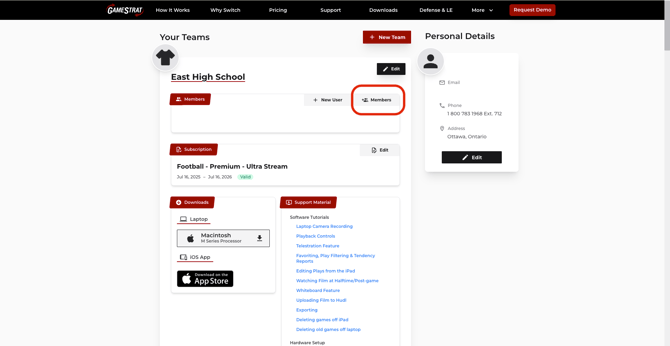
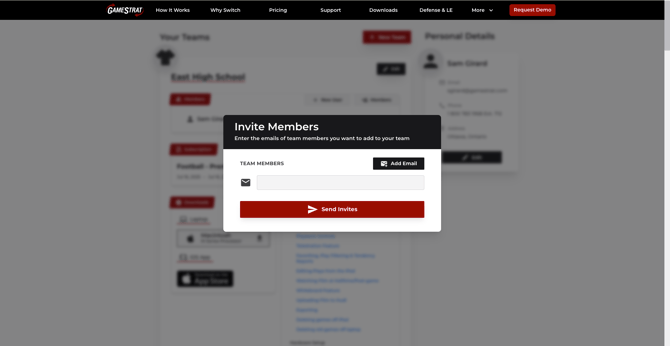
Enter the email for the person you're adding to the team. The recipient can create a personal account within your team to login on your iPads or laptop.
---
If you need assistance adding or removing members from your team account, contact us at **1-800-783-1968 x 1**.
- [Setup & Pre-Season](https://support.gamestrat.com/setup-pre-season?hsLang=en#main-content)
- [Package Setup](https://support.gamestrat.com/setup-pre-season?hsLang=en#package-setup)
- [Antenna & Signal](https://support.gamestrat.com/setup-pre-season?hsLang=en#antenna-signal)
- [Pre-Season Checklist](https://support.gamestrat.com/setup-pre-season?hsLang=en#pre-season-checklist)
- [Troubleshooting](https://support.gamestrat.com/troubleshooting?hsLang=en#main-content)
- [iPads & Connectivity](https://support.gamestrat.com/troubleshooting?hsLang=en#ipads-connectivity)
- [Networking Equipment](https://support.gamestrat.com/troubleshooting?hsLang=en#networking-equipment)
- [Camera & Video Equipment](https://support.gamestrat.com/troubleshooting?hsLang=en#camera-video-equipment)
- [Software Indicators](https://support.gamestrat.com/troubleshooting?hsLang=en#software-indicators)
- [Supported & Recommended Hardware](https://support.gamestrat.com/supported-recommended-hardware?hsLang=en#main-content)
- [Supported iPads](https://support.gamestrat.com/supported-recommended-hardware?hsLang=en#supported-ipads)
- [Supported Laptops/Computers](https://support.gamestrat.com/supported-recommended-hardware?hsLang=en#supported-laptops-computers)
- [Tutorials](https://support.gamestrat.com/tutorials?hsLang=en#main-content)
- [iPad Software Tutorials](https://support.gamestrat.com/tutorials?hsLang=en#ipad-software-tutorials)
- [Computer Software Tutorials](https://support.gamestrat.com/tutorials?hsLang=en#computer-software-tutorials)
- [Account & Team Management](https://support.gamestrat.com/account-team-management?hsLang=en)
- [FAQs](https://support.gamestrat.com/faqs?hsLang=en)
- [Game Day Tips](https://support.gamestrat.com/game-day-tips?hsLang=en)
[](https://www.gamestrat.com/)
[mailto:email@email.com](mailto:email@email.com)
Copyright © 2026, GameStrat