Hardware Status Light Indicators
Each piece of GameStrat hardware has at least 1 indicator light to show whether it's working properly, including the power boxes. Depending on the GameStrat Package your team uses, certain lights may differ. Refer to your package below:
Premium & Stadium Packages
GameStrat Press Box WiFi Antenna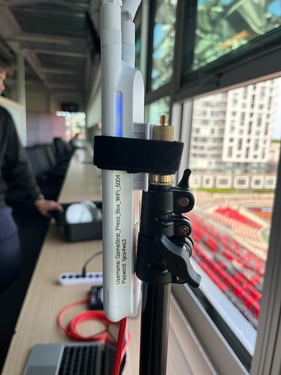
- Solid blue — antenna is active and broadcasting
- No light — Check that the red Ethernet cable is properly connected to the GameStrat Router, and that the GameStrat Router is connected to power
GameStrat Bridge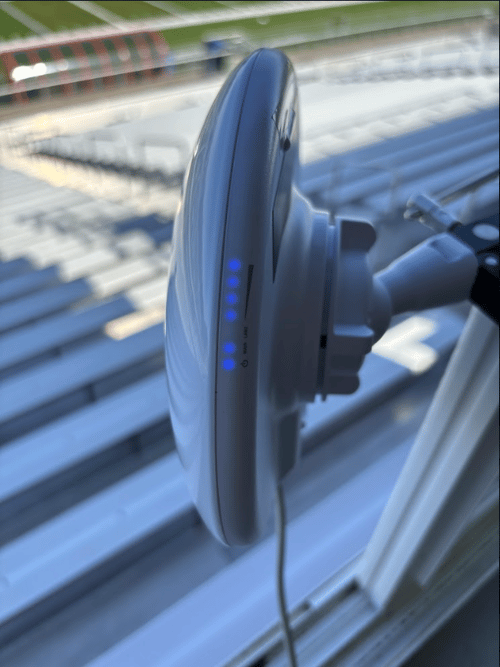
- 6 lights — connected and ready
- 2 lights — not connected to the GameStrat Station. Check alignment between the two antennas and reseat the grey cable at the GameStrat Router
GameStrat Streaming Device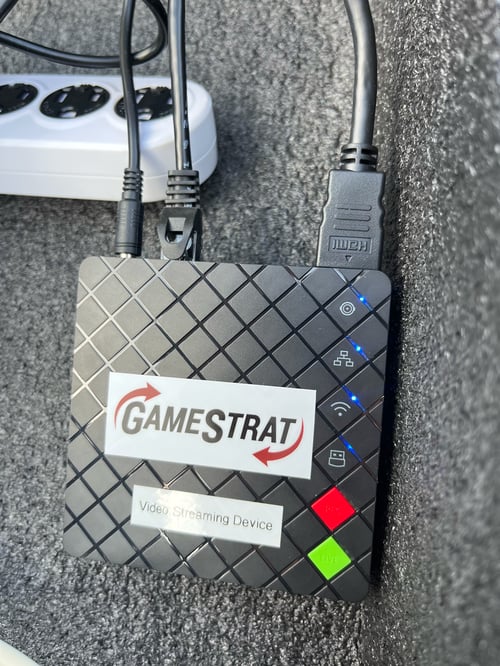
Ethernet icon (3 squares)
- Solid — network connection confirmed
- Flashing — not connected to the GameStrat network. Resecure the black Ethernet cable between the Station and the Streaming Device
GameStrat Streaming Device HDMI icon (circle)
- Solid blue — camera signal detected
- No light — no camera signal. Work through the No Signal troubleshooting article
GameStrat Sideline WiFi Antenna
- Solid blue — antenna is active and broadcasting
- Blinking — not properly connected. Check the blue Ethernet cable between the antenna power box and the GameStrat Station Power Box
- No light — Check that the red Ethernet cable is properly connected to the power box, and that there is a solid white light on the power box
Premium & Stadium Package Station Lights
GameStrat Stadium Stations (End Zone and Sideline)
- 6 lights — connected to both the Bridge and the Streaming Device or Sideline WiFi Antenna
- 2 lights - not connected to the GameStrat Bridge
GameStrat Station (Premium)
- 7 lights — connected to both the Bridge and the Streaming Device
- 6 lights — connected to the Bridge but not the Streaming Device. Check the black Ethernet cable between the Station and the Streaming Device
- 2 lights - not connected to the GameStrat Bridge
Pro Package
GameStrat Press Box WiFi Antenna
- Solid blue — antenna is active and broadcasting
- Blinking — not properly connected. Check the blue Ethernet cable between the antenna power box and the GameStrat Router.
- No light — Check that the red Ethernet cable is properly connected to the power box and that the power box has a solid white light.
Refer to our Hardware Manual and Hardware Set Up Articles (Stadium | Premium) for more information on proper antenna placement.
If you have any questions regarding your hardware's light indicators, please call us at 1-800-783-1968 x1 so we can assist you directly.