---
title: GameStrat iPad Indicators
description: Learn to read GameStrat's laptop, iPad, and hardware status lights to quickly diagnose connection issues across Premium, College, and Pro packages.
---
[Skip to content](https://support.gamestrat.com/gamestrat-status-indicators-1#main-content)
English
Show submenu for translations
[Contact Us](https://support.gamestrat.com/kb-tickets/new?hsLang=en)
- [Support Home](https://support.gamestrat.com/)
- [Login](https://www.gamestrat.com/login)
- [Return to gamestrat.com](https://www.gamestrat.com/)
Open main navigation
Close main navigation
- [Support Home](https://support.gamestrat.com/)
- [Login](https://www.gamestrat.com/login)
- [Return to gamestrat.com](https://www.gamestrat.com/)
- English
Show submenu for translations
- [Contact Us](https://support.gamestrat.com/kb-tickets/new)
How can we help you?
- There are no suggestions because the search field is empty.
1. [Support Home](https://support.gamestrat.com/?hsLang=en)
2. [Troubleshooting](https://support.gamestrat.com/troubleshooting?hsLang=en)
3. [Software Indicators](https://support.gamestrat.com/troubleshooting?hsLang=en#software-indicators)
October 2, 2026
# GameStrat iPad Indicators
## Utilize GameStrat iPad Indicators to Diagnose Connectivity Issues on Your iPads
---
iPad Indicators
The images below highlight the critical iPad indicators you'll always want to ensure are correct.
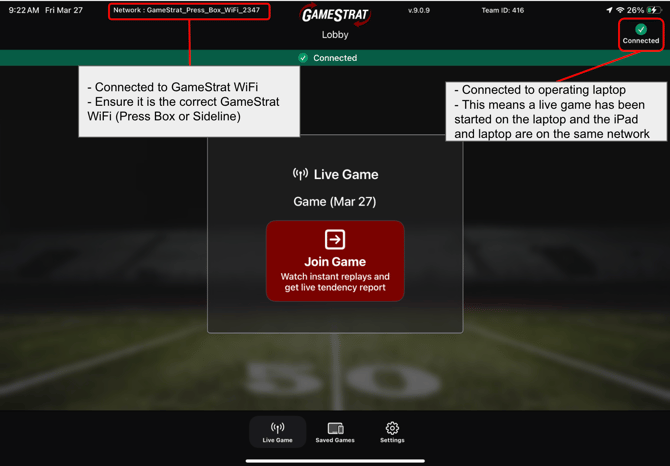
1\. The iPad is properly connected to GameStrat WiFi and to the operating laptop.
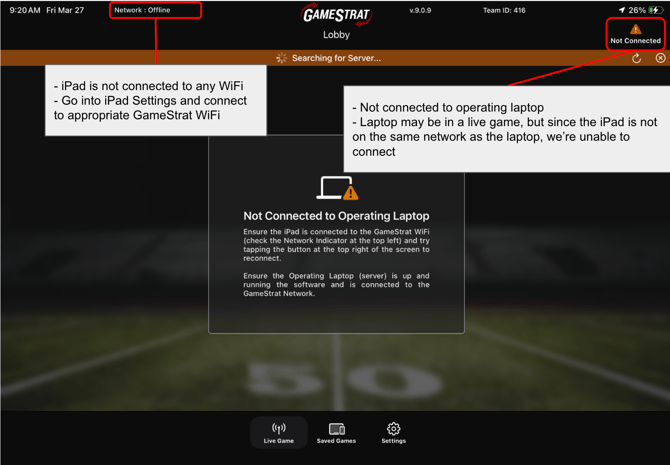
2\. The iPad is not connected to a network (or the wrong network) and is not connected to the operating laptop.
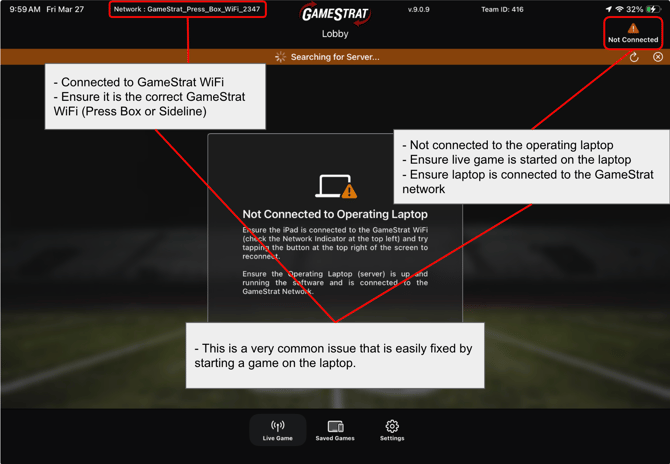
3\. The iPad is connected to the GameStrat network, but is not connected to the operating laptop.
---
If you have any questions regarding your hardware's light indicators, please call us at **1-800-783-1968 x1** so we can assist you directly.
- [Setup & Pre-Season](https://support.gamestrat.com/setup-pre-season?hsLang=en#main-content)
- [Package Setup](https://support.gamestrat.com/setup-pre-season?hsLang=en#package-setup)
- [Antenna & Signal](https://support.gamestrat.com/setup-pre-season?hsLang=en#antenna-signal)
- [Pre-Season Checklist](https://support.gamestrat.com/setup-pre-season?hsLang=en#pre-season-checklist)
- [Troubleshooting](https://support.gamestrat.com/troubleshooting?hsLang=en#main-content)
- [iPads & Connectivity](https://support.gamestrat.com/troubleshooting?hsLang=en#ipads-connectivity)
- [Networking Equipment](https://support.gamestrat.com/troubleshooting?hsLang=en#networking-equipment)
- [Camera & Video Equipment](https://support.gamestrat.com/troubleshooting?hsLang=en#camera-video-equipment)
- [Software Indicators](https://support.gamestrat.com/troubleshooting?hsLang=en#software-indicators)
- [Supported & Recommended Hardware](https://support.gamestrat.com/supported-recommended-hardware?hsLang=en#main-content)
- [Supported iPads](https://support.gamestrat.com/supported-recommended-hardware?hsLang=en#supported-ipads)
- [Supported Laptops/Computers](https://support.gamestrat.com/supported-recommended-hardware?hsLang=en#supported-laptops-computers)
- [Tutorials](https://support.gamestrat.com/tutorials?hsLang=en#main-content)
- [iPad Software Tutorials](https://support.gamestrat.com/tutorials?hsLang=en#ipad-software-tutorials)
- [Computer Software Tutorials](https://support.gamestrat.com/tutorials?hsLang=en#computer-software-tutorials)
- [Account & Team Management](https://support.gamestrat.com/account-team-management?hsLang=en)
- [FAQs](https://support.gamestrat.com/faqs?hsLang=en)
- [Game Day Tips](https://support.gamestrat.com/game-day-tips?hsLang=en)
[](https://www.gamestrat.com/)
[mailto:email@email.com](mailto:email@email.com)
Copyright © 2026, GameStrat